You open an old concert bookmark in your browser and land on a search page. Yahoo’s original U.S. map site closed in June 2015. A saved copy of Yahoo Maps Driving Directions can help if it tells you where you meant to go. If a saved link, screenshot, or search result brought you here, gather the trip details it preserves and rebuild the journey with a current map. This guide explains the shutdown, the Yahoo Japan distinction, and a careful way to check your route before leaving.
The old bookmark title itself can give you a place to start. It may point toward a venue, preserve the search wording Yahoo Maps Driving Directions, or remind you which address was entered. Look through browser history, calendar entries, email, notes, and old travel messages for surrounding details. A remembered brand proves only that the page once mattered to this trip. It does not confirm a current entrance, road condition, travel time, or route choice.
Yahoo announced in June 2015 that its standalone U.S. maps site would close at month’s end. The explanation described a shift in company and product priorities. Yahoo Maps may still appear in screenshots, saved bookmarks, and conversations about the former portal, but that history should not become a claim that every Yahoo mapping feature vanished simultaneously. The useful conclusion is narrower: the old American website is retired as a route-planning destination.
If the calendar says doors open at seven and the only note is a bookmark called “Yahoo route planning note”, start with the event confirmation. A venue name and a rough neighborhood can help you find the current visitor entrance. Keep the old link beside your notes for reference. Recover the places, stop order, and intended arrival point first. Then enter those details into a current map and inspect what changed between the old plan and the new one.
How to Use Yahoo Maps Driving Directions?
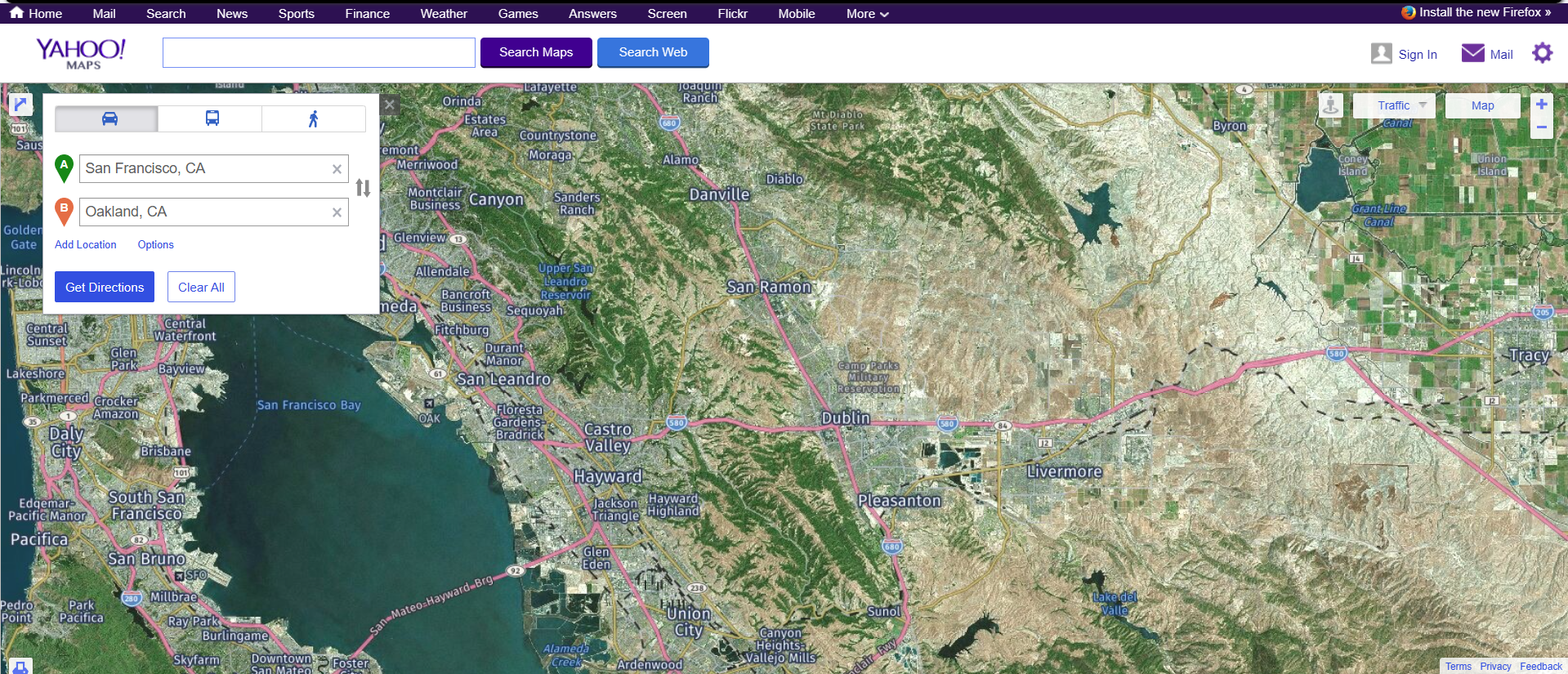
- On the former U.S. site, drivers selected the car tab.
- They entered the start and destination in the A and B fields.
- They used Add Location when another stop belonged in the sequence.
- They reviewed Options and pressed Get Directions.
The screenshot shows the old form before a route was calculated. For a trip today, enter your starting point, destination, and any stops in a current map app. Choose driving mode to calculate a fresh route.
How to Plan a trip With Yahoo Maps?
If an Oakland appointment starts at 9:00, aim to be inside by then. Set an earlier garage arrival target, such as 8:40, to allow time to park, walk, and find the right entrance. Add any stop you want to make along the way, such as picking up coffee before the bridge.
Compare two drives from San Francisco to the garage in your current map app. Include the coffee stop in one estimate. If the extra stop puts you past your 8:40 garage target, leave earlier or get coffee after the appointment. Check the final turn against the venue’s arrival instructions.
Recover the itinerary you still have
Start with records closest to the original plan. Search saved email, calendar invitations, reservation messages, screenshots, browser history, notes, and text conversations. Pull out the street address, venue name, nearby cross streets, parking instruction, and any phrase identifying the destination. If a screenshot remains, transcribe visible labels carefully. Mark uncertain characters or missing numbers. This stage collects evidence from your records. It does not validate a road or prove that an address leads to the same entrance.
Turn those fragments into an itinerary. Write down the starting point, destination, stop order, and actual arrival place. An event garage may matter more than the venue’s mailing address. Suppose an old calendar entry names a concert hall while a note says “use the east garage.” Find the hall’s current address, search for that garage or entrance street, compare the last two turns, and read the venue’s arrival instructions. Look for a street address specific to that garage.
When the details make sense, transfer them into a current map option and compare the final streets, not just the arrival estimate. Re-enter each stop instead of trusting a copied pin. Check whether the location marks a public entrance, service road, loading area, or nearby landmark. A note titled Yahoo Maps Driving Directions might list two stops. Match each one to its current street address before you settle on the order.
Choose a current replacement
Pick a replacement according to the device and the work still needed. Google Maps fits a desktop recovery that involves route comparison, several stops, or documented driving options. Apple Maps suits an iPhone-centered process with spoken guidance and settings whose availability can vary by region. MapQuest offers a browser-oriented directions workflow and documented alternate-route selection in its app. Readers who remember Yahoo Maps will recognize the start and destination boxes. For the concert hall, pick the view that shows the garage entrance and which street you’ll be turning from.
For a Google Maps rebuild, open Maps, select Directions, enter the starting point and destination, and choose driving. Review routes instead of accepting the first suggestion automatically. Where available, add stops and consider options such as avoiding tolls or highways. For someone searching Yahoo maps driving directions, this provides a current way to reconstruct the trip. It does not prove that the pin is the correct entrance or that temporary conditions are fully represented.
On an iPhone, Apple Maps starts with the destination, followed by Directions and a selected driving route. Its workflow includes spoken guidance, future leave-or-arrive timing, and options related to tolls or highways. Some features vary by country or region, so treat those controls as conditional. Confirm the starting point and destination before beginning. Inspect the final approach and parking location while stationary. Voice guidance can assist attention, but it does not replace signs, restrictions, or judgment.
MapQuest provides a browser path for entering starting and ending locations, selecting a route, and opening written directions. Its help also describes alternate routes in the app. Those controls help when an old itinerary survives as text instead of a saved map. They do not guarantee travel time, universal coverage, or arrival at the correct entrance. Recheck the address, stop order, and final turns before relying on the route, especially at a venue with separate public and service access.
The best option depends on the task, not a universal ranking. A desktop user rebuilding several stops may value a clear multi-stop workflow. An iPhone user may prefer spoken guidance. Someone working from a browser, printed note, or old email may want simple entry and written review. If the destination is unfamiliar, favor whichever service makes the approach easiest to inspect. Compare results when the arrival point, stop order, toll setting, or road constraint could change the decision.
Verify the final approach
Before departure, check the address spelling, city and state, destination pin, and named entrance. Confirm whether the venue uses a separate parking address and whether the last street is one-way. Review toll or highway settings, then read each stop in order and remove duplicates. Compare written turns with the map view where available. Construction, closures, events, and traffic can change conditions after calculation. Follow current signs and lawful instructions when the live road disagrees with an older plan.
Keep the screenshot with your notes. Note what it shows, such as a typed start field, destination label, or route shape. Beside it, save the address, stop order, and entrance note. A printed note or device screenshot may help when connectivity is poor, but an image does not establish offline navigation or guarantee directions. If a venue publishes arrival guidance, keep it with route details. Write down uncertainties for a check instead of hiding them in a copied pin.
Yahoo Japan belongs in a separate category. Its official documentation describes a regional route-search service with car, public-transit, walking, settings, and waypoints, but that does not restore the retired U.S. portal. It does not establish U.S. coverage, an English interface, or equivalence with the former American product. A reader in Japan can investigate it on its own terms. A U.S. reader should not assume that a Yahoo-branded map page answers the old request or contains the same destinations.
The quickest useful action is to open the old bookmark beside the records from the journey. Recover the address and entrance, rebuild the stop sequence in a current option, and compare the last streets. Yahoo Maps Driving Directions can name the search that led you here, but an archived phrase cannot confirm today’s route. Before driving, check the current address, entrance, road conditions, and signs. If you still cannot identify the driveway, check the venue’s current arrival instructions while you are still parked.